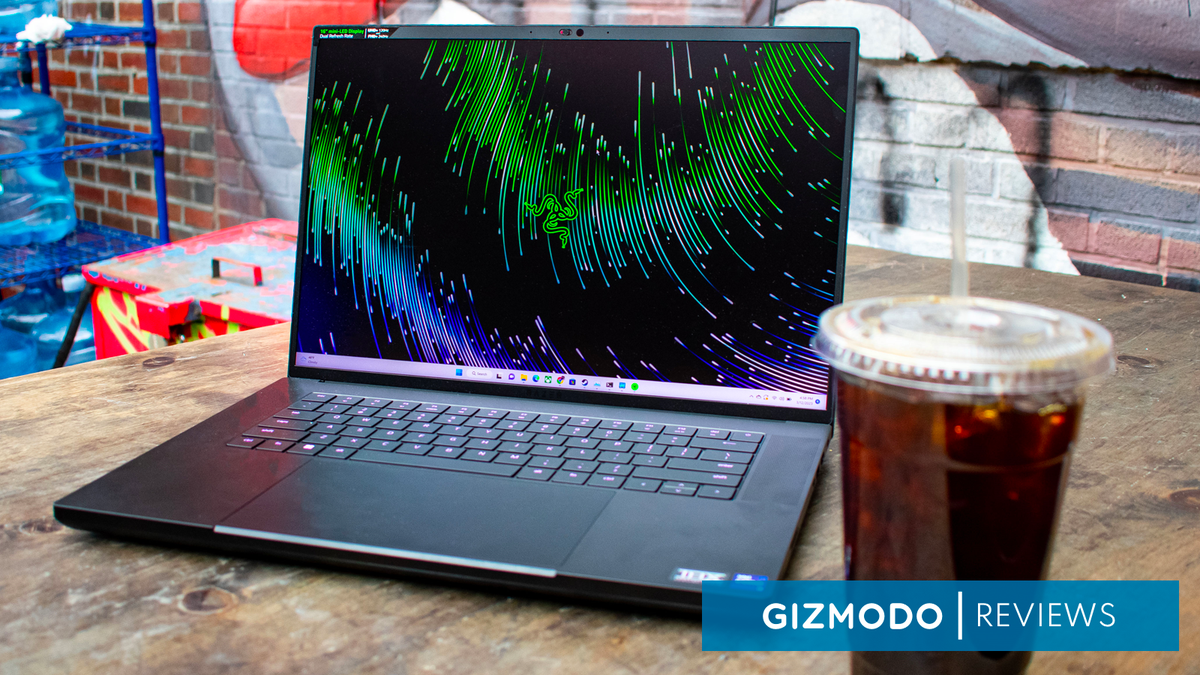
The Razer Blade 16 is The MacBook Pro of Gaming Laptops

The Razer Blade 16 is The MacBook Pro of Gaming Laptops

The Razer Blade 16 is finally here, following in the footsteps of Apple after the Cupertino company shifted its MacBook Pro design to a 16-inch model. This lets the high-end gaming laptop continue to claim the “MacBook of gaming laptops” title for another year, but even if Razer hadn’t upped the computer’s screen size, it would be a hard comparison to shake. Just like Apple’s high-end laptops, this is a gorgeous machine with an aluminum unibody design and a trackpad that’s way bigger than it needs to be.

But while Apple’s pro-level laptops are limited to what the M2 Pro and M2 Max can do, the Razer Blade 16 is equipped with the best processors and graphics cards from Intel and Nvidia, respectively. For the unit I got in for review, that means an Intel Core i9-13950HX and an Nvidia GeForce RTX 4090. But unlike something like the MSI Titan GT77 HX, the focus is on portability rather than raw power, so you’re not getting quite the same level of performance with the Razer Blade 16.

If you’re in the market for a portable gaming laptop that can easily handle most games at 4K without batting an eyelid, the Razer Blade 16 definitely gets the job done. And the bonus is that you won’t look like a gamer when you whip this laptop out at the coffee shop – aside from its copious RGB lighting, of course.

Razer still charges an Apple level premium

The Razer Blade 16 is an expensive gaming laptop. The Razer Blade in general has been one of the most expensive gaming laptops on the market for a long time, but the new model takes it to another level. This laptop starts at an eye-watering $2,699, and that model comes equipped with an Intel Core i9-13950HX and an Nvidia RTX 4060.

You can upgrade the laptop from there, though every single model comes with the same high-end processor. The price goes all the way up to $4,299, which will get you an RTX 4090, 32GB and two(!!) 1TB SSDs. That’s the model I got in for review, and I can confirm that it’s absolutely overkill for most people.

The happy middle-ground will probably be the model with 16GB of RAM and an RTX 4070, which clocks in at $2,999. That’s still an extremely expensive gaming laptop, but the display is really what you’re paying for here, and there’s nothing else on the market like it.

What’s funny is that even though Razer has had to put up with being compared with one of the most expensive laptops on the market for years now, its flagship Blade laptop is now more expensive to start than the MacBook Pro 16, which starts for $200 less at $2,499. So, maybe now the MacBook Pro is the Razer Blade of professional laptops.
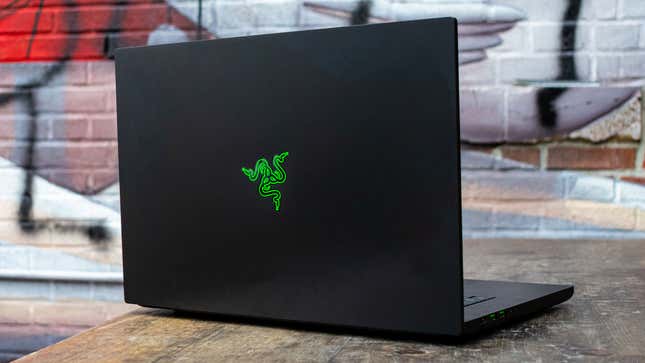
Razer Blade 16 from back

Photo: Jackie Thomas / Gizmodo

The Razer Blade 16 is prettier than most gaming laptops

The Razer Blade 16 is gorgeous. There’s no other way around that. Every single year that Razer puts out a new laptop, it improves upon the already fantastic design to make an even more luxurious gaming laptop, and the Blade 16 does exactly that again.

You’re getting the same aluminum unibody chassis, punctuated by more ports than anyone would expect out of a laptop of this size. You get three USB-A ports, an HDMI connection, 2 USB-C ports with Thunderbolt 4, an SD card reader and a dedicated charging port. This isn’t the thinnest laptop out there, but it’s still way thinner than a gaming laptop with these specs has any right to be, making the port selection more impressive than it would be on other gaming laptops.

The Razer Blade 16 measures in at just 0.87 inches thick, and weighs in at 5.4 pounds. That’s not quite ultrabook-level dimensions, but even after carrying this thing around in my backpack for weeks, I can attest that it feels pretty similar to a specced-out MacBook in my backpack. The only difference is that this can capably run The Witcher 3 after its next-gen update without any issues.

The only thing that really weighs it down from there (literally) is the huge power brick. That’s kind of a necessary evil with all the power-hungry components in this laptop, but if you’re carrying around the charger, it adds a few pounds to the weight. And, trust me, you’re going to be carrying around the charger if you’re going to be working on this thing for any extended period of time.

4K gaming at higher than 60 fps is no problem for the mobile RTX 4090

The mobile Nvidia GeForce RTX 4090 is an absolute beast of a graphics card. It doesn’t quite reach the same levels as the desktop version, of course, but this level of GPU performance in a laptop is a big deal.

There are going to be gaming laptops out there that outperform the Razer Blade 16 with a similar graphics card. The MSI Titan GT77, for instance, has much more space for cooling and runs the RTX 4090 at a higher wattage than the Razer Blade 16 does. So, if you’re after raw performance, you’re probably better off getting a bulkier gaming laptop.

But if you’re looking for something that balances portability with gaming performance, you’re in for a treat here. There isn’t a single game in the Gizmodo test suite that the Razer Blade 16 wasn’t able to run way above 60 fps, usually while also running at 4K. The lowest performance was in Metro Exodus, but even that managed 68 fps at 4K, and even when I enabled ray tracing without DLSS, it was able to get around 49 fps. Enable DLSS, and that number goes all the way up to 79 fps.
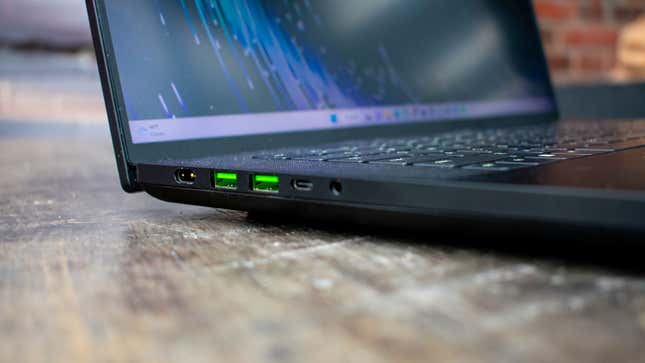
Razer Blade 16 left side ports

Photo: Jackie Thomas / Gizmodo

Far Cry 5 shows just how much of a 4K powerhouse this gaming laptop is, with the laptop managing 94 fps at the native resolution of 3,840 x 2,400. Even in games that aren’t part of our usual test suite, this is one of the gaming laptops to beat. I took the Razer Blade 16 with me to MagicCon Philly, and basically spent an evening playing the Witcher 3 next-gen update at 1600p. At that resolution, and with all the eye candy turned way up, I was able to get a solid 80 fps.

That’s less than the 2400p native resolution, but the Witcher 3 next-gen update is notoriously hard to run and I notoriously don’t compromise on visual quality for nothing. The Razer Blade 16 enables my bullshit pickiness with PC game graphics, and I love it for that.

The Razer Blade is still one of the best gaming laptops for productivity

Even beyond gaming performance, the Razer Blade 16 is a beast of a laptop. The laptop manages a Geekbench 5 score of 19,820 in multi-core and 1,975 in single-core. That’s less than the fully unlocked MSI Titan, but again, the cooling allows the MSI laptop to push the CPU harder than the Razer Blade 16.

In Blender, the Razer Blade 16 is able to push through the BMW demo in just 1 minute and 27 seconds, which actually beats out the Titan in the same test. It does fall behind the Titan in Handbrake, but not by much, processing the same video file in 2 minutes and 50 seconds, just 6 seconds slower than MSI’s flagship.

The sleek design of the Razer Blade 16 makes it less obnoxious in the office, and if you need a high-power workstation as a creative professional, I’d be hard pressed to find something more fitting for your needs – at least without forking over the cash for an actual professional workstation like .
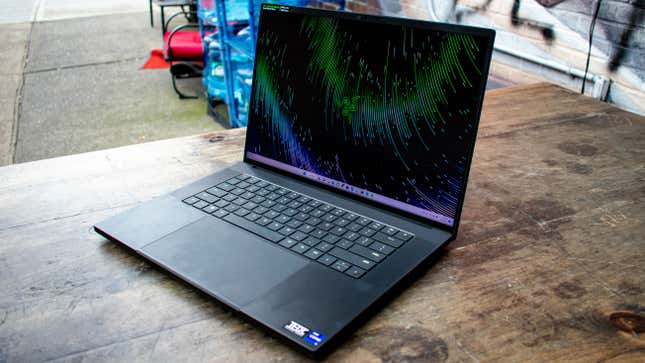
Razer Blade 16

Photo: Jackie Thomas / Gizmodo

The keyboard and trackpad are a weak link

The Razer Blade 16 has a fairly average chiclet keyboard, backed with some juicy RGB lighting. I was able to keep my unimpressive 89 WPM typing speed with no errors, so you don’t have to worry about repeat key presses or anything.

One thing that has come up in my time with the Razer Blade 15 is the large trackpad. It’s nice having a huge space for Windows 11 gestures as such, but the palm rejection really should be better for a trackpad that takes up so much of the chassis.

While working on this device, I’ve regularly accidentally triggered the touchpad, losing my place in documents or even clicking into an entirely different tab or window. You can get over this by using a gaming mouse and disabling the trackpad, but you really shouldn’t have to do that when you’re spending this much on a gaming laptop.

One of the Razer Blade 16’s biggest selling points, and probably a huge reason behind the high price, is the display. You’re getting a 16-inch mini-LED display with a ‘dual refresh rate.’ Basically what this means is that, at the native resolution of 3,840 x 2,400, you’re getting a 120Hz refresh rate. But if you lower the resolution to 1,920 x 1,200, you can up the refresh rate to 240Hz. This is great news for esports gamers that might want to use the laptop’s horsepower to drive high framerates in games like Valorant or Overwatch.

The only catch is that, to switch between these two modes, you can’t simply navigate to the Windows 11 Display Settings page and change the resolution there. Instead, you need to go into Razer Synapse, look under its display tab, and change the “Native Display Mode” to your desired resolution and refresh rate. Then, you need to restart the system.

It’s not the biggest deal in the world, but it would have been nice if you could have switched between the two resolutions on the fly when you’re playing different games. Maybe in a future release.

The display itself is gorgeous, however. The mini-LED technology that drives it allows for incredible color accuracy with some of the deepest blacks I’ve ever seen in a laptop display. It gets pretty bright, too, measuring in with a peak brightness of 473 nits. That’s not quite as high as something like the MacBook Pro, but it’s more than you’ll find on most gaming laptops.

If the luxe chassis design isn’t enough to sell you on the high price tag, the display might just be the thing that convinces you to drop thousands of dollars on the Razer Blade 16. Especially for creative professionals that’ll want the power of the RTX 4090 behind a display that can keep up with their Adobe needs.

The Razer Blade 16‘s speakers make gaming headphones optional

To test the audio, I pulled up “Heart & Feather” by Twin Tribes, and the Razer Blade 16 passed with flying colors. Unlike a lot of Windows laptops, the Razer Blade 16 has two giant speaker grilles on either side of the keyboard, each of which is equipped with a tweeter and a woofer.

It’s not going to be the same as a dedicated set of computer speakers or anything, don’t get me wrong. But it’s still more than enough for room-filling sound with actually audible bass. This means that even though the fan can get extremely loud under heavy load, you don’t need to break out a gaming headset just to play some games.

Even at max volume, there’s no hint of cracking or shaking, even in bass-heavy tracks. This is yet another way the Razer Blade just exudes luxury out of every pore.
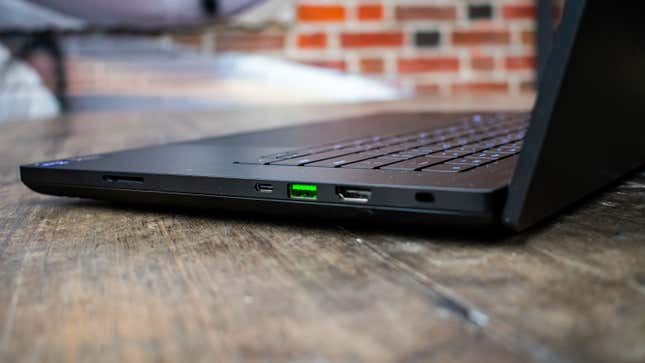
Razer Blade 16 right side ports

Photo: Jackie Thomas / Gizmodo

Less than 4 hours of battery life on video alone

The Razer Blade 16 is a gaming laptop, packed with the most powerful and power-hungry components on the market today, so from the get-go, the outlook for battery life isn’t great.

Don’t get me wrong, it’s not like the Razer Blade 16 is going to die after an hour of browsing Chrome. But at the same time, I wouldn’t trust it to get through a workday without packing the charger. In Gizmodo’s simple video playback battery test, where we stream a YouTube video at 200 nits, the Razer Blade 16 lasts just 3 hours and 43 minutes. That’s enough to get through most movies in one charge, so it’s not the end of the world.

But with so many laptops able to hit the 10 or 12 hour mark these days, the Razer Blade 16 simply isn’t the laptop to get if you’re looking for a device that will last through a long flight without having to break out a charger.

Unfortunately the charger is a bit of a chore to carry around, too. Because of the requirement for a 330W GAn charger, the power brick is huge and heavy. So, while the laptop itself weighs just over 5lb, if you’re going to be carrying it around with its power brick, the total weight comes in closer to 8lb. That’s not a deal breaker by any means, just something to be aware of if you plan on commuting with the thing.
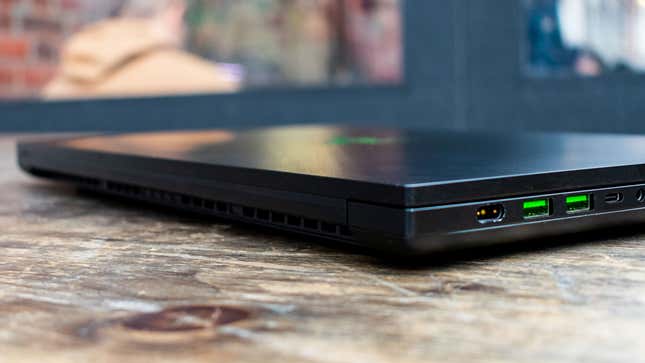
Razer Blade 16 with lid closed

Photo: Jackie Thomas / Gizmodo

The Razer Blade 16 is gorgeous, luxurious and powerful. That’s enough to get a lot of people on its side, but all of that comes with a dark side: the price. This is one of the most expensive gaming laptops on the market, even with its base configuration. You can absolutely get the same level of performance for less money elsewhere, and you probably should if all you care about is your raw frame rate in PC games.

But, like the MacBook Pro, if you want a nice looking product that you can carry around everywhere you go and not get awkward stares, the Razer Blade 16 is hard to beat. It’s a quality machine that will last you years before it starts to have trouble running the latest PC games. And the dual display mode means that even if you do have to shift down to 1080p in the distant future, you’re at least going to be getting a better refresh rate out of the deal.


UX And UI: What Are The Differences?

UX And UI: What Are The Differences?

Max Cyrek, CEO of Cyrek Digital, is an Website positioning qualified, world-wide-web designer, and digital marketing and advertising expert with above 10 several years of experience.

Metaphorically speaking, UX and UI are like a living space: Developing the partitions is the UX designer’s career, even though furnishing belongs to the UI designer. The ultimate influence will be amazing only if they share a widespread purpose and connect through the undertaking. (The most superbly embellished residing area will be incredibly impractical for you if its height is all over 5 toes, 9 inches and you are 6 toes tall.)

It would make ideal sense in development as perfectly as in internet site and software design and style.

What Specifically Is UX?

I genuinely like how the Nielsen Norman team summarizes the definition of UX: “‘User experience’ encompasses all elements of the conclusion-user’s conversation with the corporation, its companies, and its products and solutions.”

For a lot of individuals, the function of the UX designer is to format or make sketches of what a web page, application or physical merchandise is supposed to search like. Nonetheless, this purpose encapsulates a lot extra, like:

• Competitors examination.

• Assessment of the concentrate on team.

• Strategy for growth.

• Written content creation.

• Formatting.

• Prototyping.

• Exams and option iteration.

• Preparing the advancement phase.

• Coordination of the challenge with the UI designer.

• Coordination of the task with the developer.

• KPI monitoring.

• Investigation and iteration of the executed options.

The UX designer not only builds the resolution but also analyzes it ahead of introducing it. It is a extra company-focused standpoint than a engineering-targeted perspective.

What Is UI?

Immediately after developing the prototypes and testing them with the person, the UI designer has to aim on producing them appealing. The time period “consumer interface” (UI) refers to everything the consumer can interact with to use electronic products and services and goods. This contains screens and contact screens, keyboards, sounds and even mild.

The UI designer picks the coloration scheme, typography and the interactions, which healthy with the anticipations of the end users. The responsibilities of the UI designer include things like:

• Goal team analysis from the aesthetic angle.

• Examination of the competition’s design and of other alternatives.

• Branding and visible structure.

• Structure technique.

• Prototyping on versions with higher particulars.

• Interactivity and animations.

• Adaptation to all forms of screens.

• Implementation with the developer.

The part of the UI designer is the essential to any electronic interface. UI prioritizes the look of the products and solutions around the identification of the model and builds the trust and loyalty of the user.

The Synergy Of UX And UI

UI causes the consumer to come to you and UX retains them there. Great UI but undesirable UX is something that seems rather but is not purposeful. Fantastic UX but poor UI is when anything is useful but unattractive.

By operating alongside one another synergistically, UX and UI groups can build a far more seamless, pleasant and efficient encounter for the finish consumer. How can groups make certain this goes effectively?

For starters, collaboration desires to start out early in the style and design method to make certain that both equally groups are properly aligned on the goals, consumer demands and all round structure path. Afterward, common conversation and look at-ins concerning the UX and UI teams can help determine potential challenges and supply prospects for responses and iteration.

A typical structure procedure shared involving equally groups will assistance make certain regularity in the visual language, conversation and practical experience of the user. A consumer-centric mentality will assist to generate a seamless and intuitive working experience.

Conducting usability screening collectively is also extremely vital. This can supply insights into how people interact with the merchandise and support determine regions for in general improvement.

UI And UX: Diverse But Remarkably Intertwined

In conclusion, when developing a item (or generally just about anything else), each UX and UI experts engage in critical roles in guaranteeing that the conclusion user has a good and intuitive knowledge.

By working together and communicating consistently, these two teams can be certain that their do the job is aligned with the targets and requires of the close consumer. The result is a seamless and helpful person encounter that can enable construct have confidence in and loyalty with the brand name.


Forbes Agency Council is an invitation-only group for executives in successful general public relations, media technique, creative and advertising companies. Do I qualify?


Cloud computing is driving a new gig economy in tech

Cloud computing is driving a new gig economy in tech

I would be remiss if I informed you I came on this idea myself. My superior buddy Joe McKendrick a short while ago covered this craze that I have also found taking place.

The current tech industry layoffs are driving a wave of what some are calling “solopreneurs” doing gig get the job done or impartial contracting. Consider DoorDash or Uber Eats, but alternatively of delivering Thai meals, folks are providing vital cloud advisory services or even accomplished cloud-primarily based techniques all set for deployment.

This is pushed by the anticipation that a slowing economy is likely to generate down tech profits. But also, a cloud expertise shortage is taking place concurrently. We’re not making ready adequate cloud professionals to maintain up with demand, but, at the similar time, tech businesses are laying them off. Go figure.

This has been evolving for several years as staff understand the benefit of the gig economy and could be on the lookout for more independence and significantly less work reliance on the larger sized technological innovation players. Several technology pros are discovering more entrepreneurial choices in its place of opting for regular complete-time positions and comfortable benefits with companies that just cannot assurance a task for life—and by no means could.

Certainly, 63{b7c9e2c88beb1a84f22d94ab877a147f4adc4b3519717f3f957a0f34e16918d1} of tech employees report they have began their individual corporation publish-layoff, according to a recent survey of 1,000 industry experts laid off in modern a long time. Most of these new ventures (83{b7c9e2c88beb1a84f22d94ab877a147f4adc4b3519717f3f957a0f34e16918d1}) exist in the technological know-how sector, specifically cloud computing.

The people today accomplishing these cloud-centered gig positions are cloud execs with years of working experience and people today who are only lately certified. Most are getting that just as cloud computing ideal supports a remote and distributed workforce, the cloud can be leveraged for cloud technological know-how mercenary perform as nicely. This, coupled with a scarcity of cloud skills, indicates that all those with even the most rudimentary abilities come across that they have a total dance card.

Also noted in the study, individuals who enterprise out on their personal see an typical raise of $13,000 in annually earnings, and 58{b7c9e2c88beb1a84f22d94ab877a147f4adc4b3519717f3f957a0f34e16918d1} sense much better about their new occupation protection. These new gig gamers possibly concentrate on being a single human asset for sale in the marketplace or are commencing their have ventures, together with employing employees and investing their own revenue, at least $20,000, to make it a growing business issue.

I suspect that quite a few of these business owners will access a valuation of several hundreds of thousands of bucks (based on the form of cloud tech business) following a pair of yrs and ordinary development. I’ve found this individually a good quite a few periods. Beats most 401(k)s.

Also fascinating, according to the survey, 93{b7c9e2c88beb1a84f22d94ab877a147f4adc4b3519717f3f957a0f34e16918d1} report they are now competing with the firm that let them go. Believe of a “spite store” from Larry David’s “Curb Your Enthusiasm.”

This will have an all round optimistic outcome on the technology market and cloud computing specially, given that these sorts of enterprises drive much more innovation. They are not hindered by large company governance and business politics. Creative imagination and innovation are straight rewarded with gross sales and greater enterprise value. This will also raise the variety of wealthy men and women in the engineering business since this product will superior disburse prosperity among extra technological know-how marketplace contributors.

Also, larger sized corporations find it much easier to use gig workers compared to committing to choosing an worker. They are less difficult to use and then enable go if no more time essential. HR departments never have to control the marriage, and a great deal of the legal danger is taken out.

Is this a good option for you? Lots of men and women choose the gig design soon after a layoff and genuinely have identified it to be a superior selection than just looking for one more work. Some may well return to the corporate ranks when the appropriate position will come together. However, numerous cloud professionals will remain on the entrepreneurial path, even even though they never ever genuinely prepared to be on that path. They uncover gratification and benefit in likely solo. Fantastic for them.

Copyright © 2023 IDG Communications, Inc.

Save $550 on ASUS’ ROG Zephyrus M16 RTX 3070 Ti Gaming Laptop in return to $1,600 low

Save 0 on ASUS’ ROG Zephyrus M16 RTX 3070 Ti Gaming Laptop in return to ,600 low

Ideal Get is at present presenting the 2022 ASUS ROG Zephyrus M16 i9/16GB/1TB/RTX 3070 Ti Gaming Notebook for $1,599.99 delivered. Usually likely for $2,150, this stable $550 discount marks a return to the all-time reduced rate we have witnessed for this laptop design. The ROG Zephyrus will occur functioning Microsoft’s flagship functioning procedure, Windows 11, and will be powered by its Intel i9-12900H 14-core processor and RTX 3070 Ti graphics. The 16-inch 2560×1600 165Hz IPS-level display is PANTONE-qualified with 100{b7c9e2c88beb1a84f22d94ab877a147f4adc4b3519717f3f957a0f34e16918d1} coverage of the sRGB shade gamut for imaginative do the job with “incredible coloration precision and clarity.” Wi-Fi 6E, Dolby Atmos guidance, a solitary USB-C 3.2 Gen 2 port, two USB-A 3.2 Gen 2 ports, a Thunderbolt 4 port, and HDMI output spherical out this gaming machine. Head underneath for more.

On a tighter funds? Check out out the Acer Nitro 5 i7/8GB/512GB/RTX 3050 Ti Gaming Notebook for $834 instead. Right here you are going to be working with the 11th gen Intel i7 processor with RTX 3050 Ti graphics, which is a stage down from the 3070 Ti existing with the ASUS alternative above. The monitor is marginally smaller at 15.6-inches and ways down to a 1080p 144Hz resolution and refresh level. The complete sum of RAM obtainable right here is also slice in 50 {b7c9e2c88beb1a84f22d94ab877a147f4adc4b3519717f3f957a0f34e16918d1} to 8GB though that is however plenty for most modern-day online games to run nicely. Wi-Fi 6 help is also present below.

By now have a gaming desktop and want to enhance your present GPU? We’re now monitoring the GIGABYTE Gaming OC RX 6750 XT 12GB GPU marked down to $380, the new all-time lower price tag. Leveraging AMD’s very last-generation know-how, the RX 6750 XT is even now a solid graphics card for your gaming rig. Designed to tun titles at equally 1080p and 1440p at significant or extremely settings in quite a few online games, it can even take care of higher refresh charge gaming too. In addition, there’s HDMI 2.1 and DisplayPort 1.4a so you can run 4K144 and 8K60 monitors about a solitary cable.

ASUS ROG Zephyrus M16 i9/16GB/1TB/RTX 3070 Ti Gaming Laptop functions:

Dive headfirst into one of the best gaming notebook activities on Windows 11. The ROG Zephyrus M16 packs a 14-core Intel Main i9-12900H CPU and NVIDIA GeForce RTX 3070 Ti GPU into a tremendous skinny gaming laptop computer. Delight in a quickly 165Hz refresh charge, 16GB of RAM, and 1TB of PCIe 4. SSD storage all wrapped in a light 4.41 lbs chassis. The foreseeable future is slim and mild.


Subscribe to the 9to5Toys YouTube Channel for all of the hottest video clips, opinions, and more!

6 Best Laptops For Web Designers

6 Best Laptops For Web Designers

Web designing is becoming increasingly popular. As a result, to meet your professional requirements, you must own a high-quality laptop.

The web design market is a ton of talent, and you’ll need a best laptop that can manage the demanding job needs without breaking the bank.


Awards

It can be difficult to strike the right mix between your budget and the best web-design laptop available. When looking for a laptop for web design and development work, it might be tough to prioritize model characteristics, features, power, and software.

“Should I compromise memory capacity in exchange for a faster CPU?” “Is storage capacity more crucial than screen resolution?” are possibly two of the questions you’re asking yourself right now.

We’ve done the tiresome, time-consuming duties, so you don’t have to – we’ve compiled a list of the finest laptops for web design and development available today.

What Are The Best Laptops For Web Designers in 2023?

Web design and development usually have strict performance, graphical fidelity, battery capacity, and other requirements. The following are in-depth reviews of the six laptops chosen:

  1. Acer Aspire 5 Slim Laptop – Budget-Friendly Laptop for Web Designer 
  2. Dell XPS 9500 – Best for Overall
  3. Apple MacBook Air — Best Macbook for Web Designers
  4. Lenovo IdeaPad 3 Laptop – Overall Best Performance Laptop for Web designers
  5. Microsoft Surface Laptop 3 – Best LaptopFor Web designers
  6. ASUS VivoBook 15 — Best Budget Laptop for Web Development

1. Acer Aspire 5 Slim Laptop – Budget-Friendly Laptop for Web Designers 

Here is the first of the best laptops for web designers. The Acer Aspire 5 is perfect for your web design and development work because it works well.  However, this device’s design and function are better than its predecessors. Even in 2023, This is Best Laptop for Freelancers.

The device looks modern and has a strong metal frame that protects the engine from outside forces. Typing is easier and more comfortable with a full-size keyboard system.

In this version, the perfect highlight is working performance, which you can’t miss.

The device has a Ryzen 3 3200U processor and a 128GB SSD hard drive. Moreover, this helps speed up the way data is processed and gives it plenty of space to store many different kinds of data.

This device has a standard 15.6-inch screen and smart anti-glare technology that helps protect the user’s eyesight as much as possible. The sharpness and realism of the image through this device are impressive.

Pros:

  • The best in every way
  • Great picture quality
  • Stable size of the screen
  • Amazing battery timing

Cons:

Technical Specification:
Display 15. 6 inches, 
Resolution  1920 x 1080
Storage 128 GB
RAM 4GB 

2. Dell XPS 9500 – Best for Overall

Here is another amazing one of the best laptops for web designers. If you want the best laptop for web development that can handle anything you throw at it, you don’t need to look any further. 

Corning Gorilla Glass 6, which is impossible to break, is used to make the screen of the Dell XPS. 

Also, the display’s Infinity Edge and narrow bezels make it possible to see every detail. This is very important for web design, which depends greatly on accurate colors.

In this version, the trackpad is 62{b7c9e2c88beb1a84f22d94ab877a147f4adc4b3519717f3f957a0f34e16918d1} bigger than the last one. When used with Windows 10 Home, it will help you get more done. 

There are different configurations, but the Creator Edition has NVIDIA Geforce GTX 1650 Ti graphics and an Intel Core i7 CPU from the 10th generation. 

This means that 100{b7c9e2c88beb1a84f22d94ab877a147f4adc4b3519717f3f957a0f34e16918d1} of the Adobe Color information is correct and that Adobe programs are faster and more stable. 

Moreover, it is one of the best laptops for web design because it can make graphics with a high resolution. We can say that this is one of the best laptops for web designers in 2023. 

Pros:

  • Full HD+ display 
  • Overall best performance
  • A large keyboard with enough space between the keys.

Cons:

Technical Specification:
Display 15. 6 inches, 
Resolution  3840×2400 Pixels
Storage 1 TB
RAM 4GB 

3.  Apple MacBook Air — Best Macbook for Web Designers

One of the most portable laptops on this list is the MacBook Air. Also, it is light and easy to carry without sacrificing performance.

It comes with an Intel quad-core i5 CPU, which lets the laptop run smoothly even when running multiple programs simultaneously. However, it also comes in another configuration with a cheaper Intel dual-core i3 processor.

Also, the latest version of Apple comes with an Intel Core i7 processor, but you might not need that.

As usual for Apple, the 256GB SSD storage with the i3 model and the 512GB hard drive with the i5 model make this one of the best choices. If you think you’ll need more space soon, you can add up to 2TB to any model.

The MacBook Air runs on macOS, which is known for being easy to use, just like any other Apple laptop.

This Macbook Air has a beautiful retina display thanks to the Intel Iris Plus Graphics GPU. We can say that this is one of the amazing cheap laptops for web designers. 

Pros:

  • Portable
  • Light in weight
  • Budget-friendly 
  • Comfortable keyboard

Cons:

Technical Specification:
Display 13 inches, 
Color Space Gray
Storage 256 GB
RAM 8 GB 

4. Lenovo IdeaPad 3 Laptop – Overall Best Performance Laptop for Web designers

Work like web design and development is hard, so you need a laptop that runs smoothly.

And the Lenovo IdeaPad 3 is a great one. Products are made to meet the needs of your business quickly and effectively.

This is shown by the device’s powerful AMD Ryzen 5 5500U processor and 256GB of stable storage space.

They make it faster to get to data and process it. At the same time, it helps store many important web design documents.

Compared to earlier models, this one has a much better design. It looks sleek and polished and has a narrow bezel on all four sides, letting you see more of the FHD screen. It also helps keep other products from getting in the way.

The cooling system is the smartest thing about this smart device. However, it uses technology unique to the company to keep the whole computer cool.

If You need Lenovo’s more powerful laptop then: Top 5 Lenovo Laptop with 64GB RAM.

Pros:

  • Modern design
  • Best Battery timing
  • Amazing storage space
  • Reasonable price

Cons:

Technical Specification:
Display 14  inches, 
Resolution  1920 x 1080  Pixels
Storage 256 GB
RAM 8 GB 

5.  Microsoft Surface Laptop 3 – Best LaptopFor Web designers

Are you still looking for the best laptops for web designers? No worries this is another best option for you. The Microsoft Surface Laptop 3 is a powerful laptop made for doing more than one thing at once and making websites and this is best laptop under $700. 

However, this laptop is run by an AMD Ryzen 7 CPU, a strong competitor to the always-popular Intel. 

This CPU can handle tasks that involve more than one thread, such as transcoding, video editing, website design, and many others. 

The Microsoft Surface Laptop 3 has a battery life of 11.5 hours with Fast Charging, Omni sonic speakers with Dolby Audio, and a Windows 10 Home that is even safer.

Pros:

  • Amazing battery life
  • Outstanding performance
  • Lag-free multitasking with AMD processor 

Cons:

Technical Specification:
Display 13.5  inches, 
Resolution  2256 x 1504 Pixels
Storage 128 GB
RAM 8 GB 

6. ASUS VivoBook 15 — Best Budget Laptop for Web Development

Here is another one of the best budget freindly laptops for web designers. The best choice for students new to web design and development is the ASUS VivoBook 15. It works well and doesn’t cost too much a rare combination.

It has an Intel Core i3 processor from the 10th generation, which is fast, especially for a web developer.

Also, the laptop comes with a 128GB SSD hard drive that can be upgraded if you need more storage space.

The VivoBook 15 uses the Win 10 Home operating system in S mode, just like the Acer Aspire 5. You can also leave S mode if it limits you too much.

The laptop is one of the best for web design because it has Intel UHD Graphics, which makes it easy to play videos. This is great for web designers.

Pros:

  • Budget-friendly 
  • Modern design
  • Fast charging
  • Light in weight

Cons:

Technical Specification:
Display 15.6  inches, 
Resolution  1920 x 1080 Pixels
Storage 128 GB
RAM 8 GB 

How to Choose The Best Laptops for Web Designers?

Here are some things to consider before buying the best laptops for web designers. 

Processor:

The processor is the brain of your laptop, and it’s essential to have a fast one for web design. Look for laptops with at least an Intel Core i5 or i7 processor or an AMD Ryzen 5 or 7. These processors will provide the speed and power you need to run multiple design programs simultaneously.

Memory:

Memory, also known as RAM, is another important consideration for web designers. Having a laptop with at least 8GB of RAM will ensure that your computer can handle multiple design programs and large files without slowing down. If possible, opt for 16GB of RAM for even more performance.

Storage:

Web designers often work with large files, such as graphics and videos, so storage is another important factor to consider. Look for laptops with at least 256GB of storage, preferably 512GB or more. Solid-state drives (SSDs) are also a good choice as they are faster than traditional hard drives.

Display:

A good display is crucial for web designers, as it lets you see your designs in great detail. Look for laptops with a high-resolution display (at least 1920×1080) and a wide color gamut. This will ensure that your designs are accurate and vibrant. Touchscreen displays are also useful for web designers, allowing for more precision and control.

Portability:

Web designers often need to work on the go, so portability is an important consideration. Look for laptops that are lightweight and easy to carry around. Be sure to check the laptop’s battery life, as a laptop with a long battery life will be more convenient when working away from a power source.

Battery life:

Look for a laptop with good battery life so you can work longer without having to plug it in.

Price: 

Web design laptops can be expensive, so consider your budget and look for a laptop that offers the best balance of features and price.

Final verdict:

In this article, we have told you about the best laptops for web designers.  Web design is a demanding field, and it’s important to have the right tools to keep up with the latest trends and technologies. A reliable laptop is one of the most important tools for a web designer, and it’s essential to choose one with the right features for your needs. Consider the processor, memory, storage, display, and port.

cloud services investment: Enterprises likely to continue to invest in cloud services despite US slowdown: McKinsey

cloud services investment: Enterprises likely to continue to invest in cloud services despite US slowdown: McKinsey
The impending financial slowdown might not considerably effects the IT products and services industry since the shifting position of technology in company has resulted in a delinking involving the US overall economy and the advancement of IT providers, senior McKinsey leaders stated.

“This is what we simply call the ‘great decoupling’,” explained Vikash Daga, senior associate at McKinsey & Business. “As we converse to CIOs (chief information and facts officers), the check out is that the position of technological know-how has improved in business enterprise and it is now a key enabler for development.”

This is unlike what happened all through the money disaster of 2008-09 when IT providers development plummeted as a result of the dip in the US GDP development rate, Daga stated.

In accordance to the administration consultancy firm, enterprises are envisioned to keep on to make investments in cloud providers, with the industry envisioned to mature to $450 billion by 2025 from about $250 billion now.

“We feel that electronic and analytic expert services that are created on best of the cloud will see rapid growth,” explained Steve Van Kuiken, senior spouse and global leader of McKinsey Engineering, McKinsey & Enterprise.

This section by yourself is envisioned develop at 20-30{b7c9e2c88beb1a84f22d94ab877a147f4adc4b3519717f3f957a0f34e16918d1} a calendar year to $60-65 billion by 2027 from $20-25 billion, in accordance to McKinsey. About 40{b7c9e2c88beb1a84f22d94ab877a147f4adc4b3519717f3f957a0f34e16918d1} of cloud spends will be from new services like Edge, IoT (Internet of Issues) and AR/VR (augmented and digital truth) among the other folks by 2025, up from about 30{b7c9e2c88beb1a84f22d94ab877a147f4adc4b3519717f3f957a0f34e16918d1} now.

Learn the tales of your fascination


“When the initial wave of cloud migrations transpired, a great deal of providers moved a large amount of applications to the cloud, but the way the organization operates didn’t seriously alter,” Van Kuiken mentioned. “A McKinsey survey shows that up to 90{b7c9e2c88beb1a84f22d94ab877a147f4adc4b3519717f3f957a0f34e16918d1} of the early cloud migrations didn’t attain what they predicted.”As a final result, there will be a change in direction of consequence-dependent contracts, with a bigger concentrate on driving more price out of these transitions, he said.

“Tech service suppliers by themselves have to be substantially extra targeted on not just moving programs, but reengineering and transforming the way enterprises work, and they’re heading to have to construct facts and digital expert services on top rated of it,” Van Kuiken explained.

As a outcome, the two cloud and provider companies are anticipated to get started to deliver more verticalised choices in purchase to cater to particular industries.

There’s also been an improve in fragmentation in IT spends. “Specialty firms are popping up to present these electronic and analytic services,” Van Kuiken stated. These firms are centered on unique use cases or locations of influence “while big sellers are still concentrated on the transformation of the IT engine”.

Hence, it will be vital for a services company to be each benefit oriented when it will come to cloud implementation and also tackle some of the personal company styles, building a holistic transformation product for clients, he said.

Continue to be on top of technology and startup news that issues. Subscribe to our day-to-day newsletter for the most recent and should-examine tech news, sent straight to your inbox.